Branch office
Start with access switching, the PoE budget for phones and access points, WiFi coverage and a security gateway. EX switches, Mist access points and SRX firewalls can be selected around these requirements.

Industries we serve
Connect your people, applications and offices with a practical equipment plan. Bring switching, WiFi, security and server compute together, with local engineers to configure and support the deployment.
Start with access switching, the PoE budget for phones and access points, WiFi coverage and a security gateway. EX switches, Mist access points and SRX firewalls can be selected around these requirements.
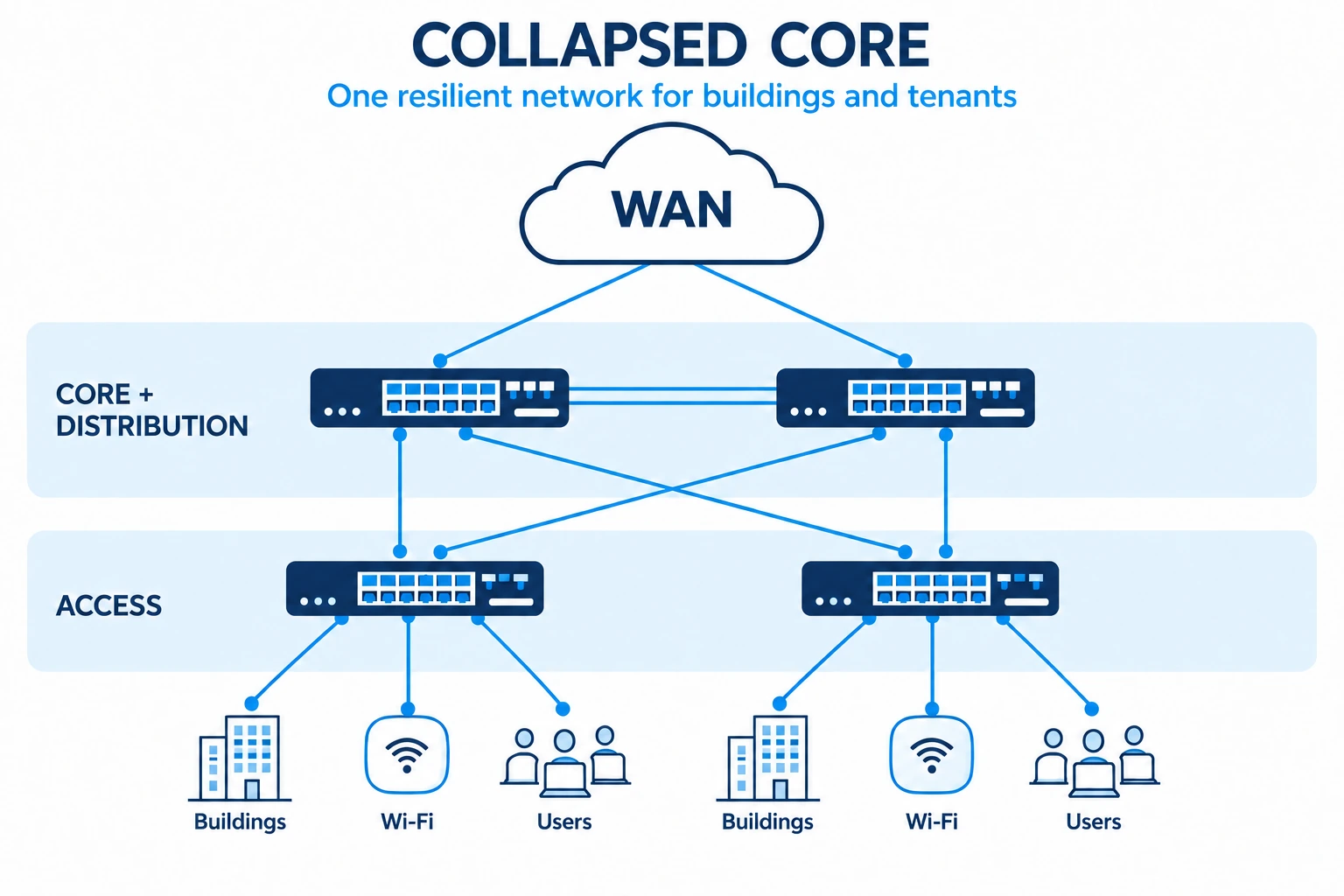
A redundant collapsed core keeps smaller campuses manageable. Larger deployments may benefit from a fabric design. Plan floor uplinks, voice traffic, client density and separation between departments or customers.
Connect branches with routed WAN links or secure VPNs and consistent access policies. Match Dell server compute and storage to business applications, virtualization and backup needs.
QoS gives important traffic appropriate priority during congestion. Agree application classes and bandwidth limits, then test voice and video under realistic load.
Size coverage for concurrent clients, not floor area alone. Check access-point placement, roaming, switch power budgets and uplink capacity together.
Keep guest, staff, voice and sensitive application traffic in appropriate network segments. Define firewall policies and remote-access requirements before deployment.
Select redundant uplinks and power where needed. Stacking or Virtual Chassis can simplify management on supported models; validate failure behavior and document recovery steps.
Technical buying guide
Campus networks are primarily about forwarding capacity, power delivery, wireless airtime and resilience. Buying more switch CPU or RAM is rarely the first answer to slow user traffic. Specify access ports, uplinks, security services and operational scale against the users and applications the network must support.
1IX editorial · Sources checked
Access speeds, aggregate uplinks, oversubscription and queues.
Endpoint power, AP uplinks, concurrent clients and airtime.
Failure paths, routing tables, segmentation and management.
Oversubscription is the nominal downstream capacity divided by available upstream capacity. For 48 × 1 Gb/s access ports and a 10 Gb/s uplink it is 4.8:1. That ratio is a planning indicator, not a prediction of congestion: actual simultaneous traffic matters. Check utilization and queue drops during busy periods. QoS (quality of service) can prioritize voice during contention but cannot create additional bandwidth.
Sizing visual · Calculated example
Nominal aggregate capacity · Gb/s · all normal-state members active
A redundant uplink pair loses half its nominal capacity when one equal-speed member fails.
Calculated by 1IX for active/active equal-speed members. Actual forwarding depends on topology, link aggregation, hashing and overhead. A single flow generally uses one member link. These are capacity scenarios, not switch benchmark results.
An aggregation group can spread multiple flows across links, but a single flow is generally limited by the member link selected by the hashing policy. Recalculate capacity after a link failure. Two active 10 Gb/s uplinks offer 20 Gb/s nominal aggregate capacity; if one fails, the remaining path is 10 Gb/s. Redundancy needs an explicit capacity and convergence test, not just a second cable.
PoE means power over Ethernet. Count phones, cameras and access points and check their supported power classes, startup demands and cabling. Juniper’s guide lists different switch-wide budgets by model and power-supply configuration. A per-port maximum does not mean every port can deliver that maximum simultaneously. Also check the available budget after a power-supply failure. Wireless planning must cover concurrent clients, airtime, interference and roaming, rather than floor area alone.
Sources: Juniper: PoE user guide and model-specific power-budget tables
Sizing visual · Source-backed model
EX2300-24P: 370 W switch-wide PoE budget · hypothetical allocated loads
Dashed marker: 370 W budget
Port count and per-port PoE support do not establish the total available power.
Juniper lists a 370 W maximum PoE budget for EX2300-24P. Loads above are 1IX arithmetic examples using assumed switch-side power allocations per port, not measured device draw or power delivered at the endpoint. Account for negotiation, cable losses, startup requirements and reserve. Excess demand cannot be supplied simultaneously.
Juniper PoE guide: EX2300 maximum power-budget table ↗Switching ASICs handle the data path; the control-plane CPU and memory handle tasks such as routing protocols and management. Check forwarding and packet-rate specifications alongside MAC/ARP/route scale and the enabled security features. A collapsed core can be appropriate for a smaller campus. EVPN-VXLAN separates an IP underlay from an overlay for segmentation; Juniper’s validated design describes BGP, ECMP (equal-cost multipath) and BFD (failure detection) as parts of a resilient fabric. The operational complexity must fit the team.
Sources: Juniper Validated Design: campus fabric core-distribution ERB
Aggregate uplink Gb/s · access capacity = 48 Gb/s
Select EX equipment by supported port speeds, PoE budget, uplinks and software features. Dell server generation is not a campus-switch classification.
Evaluate supported EX or QFX roles against traffic, route scale, optics and resilience. A fabric is a design choice, not a requirement for every office.
When Dell 14G, 15G or 16G servers attach to the campus, check NIC speeds, transceivers and upstream capacity. A newer server does not remove a congested network path.
Share your measurements and growth plan. Ask us to separate equipment pricing from configuration, migration, deployment, support and warranty options, with stock, lead times and service scope confirmed in writing.
Receive an itemized equipment and services proposal. Confirm stock, delivery timing, installation scope and warranty options for your selected hardware.
Agree staging, configuration, connectivity and failover checks before deployment. Plan the migration window and rollback steps around your operations.
Arrange installation, documentation and handover with local engineers. Define warranty coverage and the 24/7 support and escalation process in your quote.
Share what you already know. Our engineers can help clarify the remaining requirements.