
Dell PowerEdge · 16th Generation
Configure your Dell server
Configure your Dell PowerEdge 16th-generation server for virtualization, databases, AI or storage. Choose supported Intel Xeon processors, DDR5 memory and drives to match your workload, then request an itemized quote from our team.
Size the whole system, not just the processor
- 01
Storage
Capacity & latency
- 02
DDR5
Active memory
- 03
Xeon
Cores & licensing
- 04
Networking
Throughput & growth
Balance storage → DDR5 memory → Xeon compute → networking around application demand. For virtualization, consider VM count, vCPU demand, active memory, storage latency and growth together. A balanced build can support consolidation; savings depend on utilization, software licensing and the complete system’s power at the expected workload.
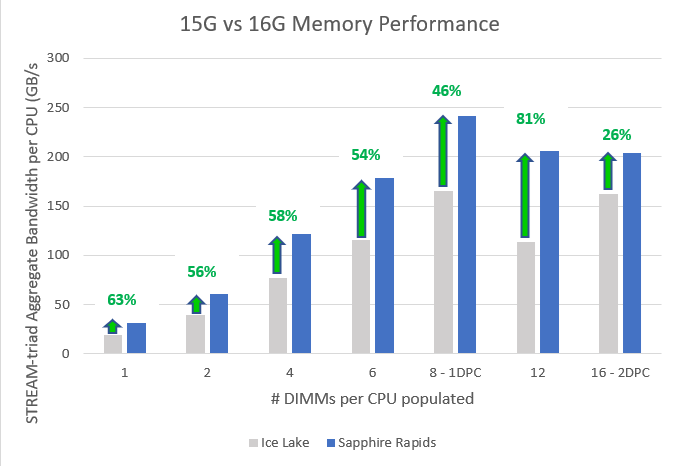
CPU and memory: capability versus measured results
With eight DIMMs per CPU, Dell measured 46% higher memory bandwidth on the R760 in this test.
Ready to turn your requirements into a build?
Configure my serverCompare models side by side
| Specification | R760xs | R760 | R760xa | R760xd2 |
|---|---|---|---|---|
| Starting fromChassis only · excludes 12% VAT | Loading price… | Loading price… | Loading price… | Loading price… |
| Best suited for | Efficient mainstream compute | Memory-intensive databases and flexible expansion | GPU acceleration and AI | Dense storage and backup |
| Rack size | 2U | 2U | 2U | 2U |
| Processors | 2 × Intel Xeon Scalable (4th Gen ≤32 cores/CPU; 5th Gen ≤28) | 2 × Intel Xeon Scalable (4th / 5th Gen; up to 64 cores/CPU on supported 5th Gen) | 2 × Intel Xeon Scalable (4th / 5th Gen) | 2 × Intel Xeon Scalable (4th / 5th Gen) |
| Memory slots | 16 DIMM | 32 DIMM | 32 DIMM | 16 DIMM |
| Memory technology | DDR5 ECC RDIMM · ≤1.5TB | DDR5 ECC RDIMM · ≤8TB | DDR5 ECC RDIMM · ≤8TB | DDR5 ECC RDIMM |
| Front drive options | Up to 24 × 2.5″ (16 SAS/SATA + 8 NVMe) or 12 × 3.5″ SAS/SATA | SAS/SATA/NVMe chassis options | Up to 8 × 2.5″ SAS/SATA/NVMe | Up to 24 × 3.5″ SAS/SATA (front + middle) |
| Expansion | PCIe Gen4 / Gen5 · Up to 2 low-profile, single-width 75W GPUs | PCIe Gen4 / Gen5 · Up to 2 double-width or 6 single-width GPUs | PCIe Gen5 · Up to 4 double-width or 12 single-width GPUs | Rear storage / PCIe layout depends on chassis |
| Memory speed (supported 5th Gen) | Up to 5200 MT/s | Up to 5600 MT/s | Up to 5600 MT/s | Confirm CPU and DIMM population |
Options are chassis-dependent, not simultaneous. Exact CPU, memory population, backplane, riser and power support must match the selected unit.
R760xa: on-premises AI and published inference results
Keep prompts, retrieved documents and inference within your infrastructure. An access-controlled document index with retrieval-augmented generation (RAG) can connect a local model to manuals, policies and technical records. Select GPU memory, model precision, context length and concurrency first; then balance CPU, RAM, storage and networking. Local deployment still requires application-level access controls and data governance.
Dell tested Llama 3 8B at FP16 on R760xa with one NVIDIA L40S. Aggregate output throughput was 53.71, 479.67 and 1,086.27 tokens/s at 1, 10 and 25 concurrent requests. At 25 requests, time to first token was 141.52 ms and request latency 3.28 s. With four L40S GPUs, Llama 3 70B at FP8 achieved 234.16 aggregate tokens/s, 330.41 ms to first token and 5.88 s latency at 10 concurrent requests. Both tests used 128 input and 128 output tokens. These are specific tested configurations, not guaranteed results for another model, prompt length or build.
Dell scalable inferencing study — Tables 5 and 6 ↗R760: database and search evidence
In a Principled Technologies MySQL 8.0 comparison, R760 running VMware vSphere 8.0 processed 84% more new orders per minute than R750 on vSphere 7.0. The HammerDB TPROC-C test used 10 database VMs per server. Hardware and software differed between systems, so this is a complete-system result rather than an isolated CPU uplift.
Separately, Dell’s concurrent Elasticsearch indexing/querying tests found lower search latency and up to 1.24× performance on R760 with Xeon Platinum 8460Y+ versus R750 with Platinum 8380. Review the test configuration and your workload rather than applying the multiplier to every application.
MySQL test methodology and system configurations ↗Dell Elasticsearch test and results ↗Storage, boot and expansion planning
Choose the drive interface and chassis before counting usable capacity. HDDs favor bulk files, archives and capacity-led storage; mechanical seeks limit small random requests. SATA SSDs remove mechanical latency and suit boot volumes and general applications, with a SATA interface ceiling of 6 Gb/s. NVMe uses PCIe and a parallel, low-overhead protocol for busy databases, virtualization and analytics; bandwidth still depends on the drive and PCIe link.
NVMe-capable layouts are available across R760xs, R760 and R760xa, but not every bay or controller supports every interface. The referenced R760xs starting build uses two 240GB SATA SSDs in RAID 1 and four 1GbE RJ45 ports; it is not an NVMe configuration. Confirm the current itemized quotation. Optional BOSS-N1 mirrored M.2 NVMe boot storage can separate the OS from application drive bays in an appropriate configuration. RAID is not a substitute for backups.
PCIe Gen5 doubles theoretical per-lane bandwidth relative to Gen4; the installed riser, slot and adapter determine usable lanes and speed. OCP 3.0 offers modular network-adapter choices. Size network throughput for storage traffic, backups and dense virtualization, and check power and cooling when adding GPUs or high-throughput adapters.
Review the referenced R760xs starting configuration ↗Security and serviceability belong in the build
Silicon Root of Trust, signed firmware and Secure Boot protect the platform foundation. Pair them with operating-system patching, access controls and a recovery plan. ECC memory, supported hot-swap drives and redundant power address different failure modes; application resilience and separate backups remain necessary. Confirm component compatibility, condition, software, warranty, tax and delivery terms in the quotation rather than inferring them from a platform specification.